

Example worksheet · Organicaly editorial heuristic
Score the finding. Then consider the dependency.
Change the evidence or effort for one finding and see how its relative priority changes. The score predicts neither traffic nor revenue.
Priority score: 40.5
3 × 3 × 3 × 3 ÷ 2 = 40.5
Blocker rule: scope this high-intent, severity-3 finding in the next planning cycle even if effort lowers its score. Confirm whether it actually blocks crawling or indexing.
Dependency: Pair with E: restore crawlable pagination and self-referencing canonicals.
Relative order with your current inputs
- A — Products reachable only through “load more”40.5
- E — All paginated pages canonicalise to page 136.0
- B — Sale price differs between page and feed27.0
- C — Unbounded filter combinations18.0
- D — Category lacks useful buying guidance18.0
- F — Useful wide-fit subcategory missing6.0
- G — Colour variants use fragments5.3
Nothing is saved or sent. Other rows keep their example values. Equal scores still need a judgment call.
Most e-commerce SEO backlogs look the same: a long list of fixes from an audit tool, a few content ideas, and a note to “improve product descriptions.” Everything seems important, so the team works on whatever is easiest, or whatever the loudest stakeholder raised last.
A strategy is the decision about what to do first and why. This guide gives you a repeatable way to make that decision for an online store. You work at the level of page templates rather than individual URLs, and you weight every item by the buying intent of the pages it affects.
You’ll get:
- a map of e-commerce templates and the buying intent each one serves,
- the technical prerequisites Google documents for e-commerce sites, organised by template,
- an impact/effort worksheet with clear scoring rules, and
- a worked example for one category, from findings to a sequenced plan.
The short answer
- Think in templates, not URLs. A fix to one category template can improve hundreds of pages at once. A fix to one URL improves one.
- Weight by buying intent. Category and product templates sit closest to the purchase. Problems there usually matter more than the same problem on a blog archive.
- Clear technical blockers first. If Google can’t reach or correctly interpret a template, content improvements on that template can’t do their job.
- Score, then sequence. Use one consistent scoring method, then adjust the order for dependencies and capacity.
- Log and measure every change against a fair before-and-after window, by template.
Step 1: Inventory your templates
Start by listing every page template on the site and roughly how many indexable URLs each one produces. You don’t need precise counts. Order-of-magnitude bands are enough to see where scale lives.
| Template | Typical role | Buying intent | What usually goes wrong |
|---|---|---|---|
| Home | Brand entry point and main navigation hub | Mixed | Links to priority categories are buried or script-driven |
| Category / collection | Browse a product type and compare options | High (commercial) | Thin or missing guidance, crawl traps from filters, products hidden behind “load more” |
| Subcategory | Narrower product sets, such as a style, use or fit | High | Missing where demand exists, or duplicated where it doesn’t |
| Filtered / faceted listing | Combinations of attributes, such as size + colour + brand | Varies; mostly low as landing pages | Unlimited crawlable combinations, duplicate and empty pages |
| Product | Evaluate and buy one item | Highest (transactional) | Manufacturer copy, missing specs, data that disagrees with the feed |
| Product variant | A size or colour of a product | High | Variants that can’t be addressed by URL, or that compete with the main product |
| Brand page | All products from one brand | High | Thin listing with no reason to exist as a landing page |
| Guide / blog | Answer research questions before purchase | Informational to commercial | Disconnected from categories and products, written for keywords rather than decisions |
| Internal search results | Help visitors find items | Low as a landing page | Indexed by accident, creating duplicates |
| Paginated listing pages | Pages 2+ of a category | Supports category | Canonicalised to page 1, or not linked crawlably |
Step 2: Map buying intent to templates
Next, group your search demand by intent and assign each group to the template that should answer it. This step stops two common mistakes: building a blog post for a query that deserves a category page, and creating a near-empty subcategory for a query that’s really a research question.
A simple rule of thumb (our heuristic, not a Google rule):
- “[product type]”, “[product type] for [use]”, “[attribute] [product type]” → a category or subcategory, if you have enough products to make a useful page.
- “[brand] [model]”, “[product name] [size/colour]” → product or variant.
- “best [product type] for [need]”, “[option A] vs [option B]” → a guide that links to the relevant categories and products.
- “how to [care / fit / choose]” → a guide, linked from the product pages where the question comes up.
Then mark each intent group with a weight from 1 to 3 for how close it sits to a purchase. You’ll use that weight in the worksheet.
Step 3: Check the technical prerequisites by template
Google’s e-commerce documentation covers the issues that most often stop store templates from being crawled, indexed or understood. Here’s that guidance, organised by the template where it usually matters. The statements are Google’s; the grouping is ours.
Navigation and internal links (home, category, subcategory)
- Google uses links between pages to understand a site’s structure, and the number of links needed to reach a page and the number pointing to it to estimate its importance. (Site structure)
- Use standard
<a href>links. Products reachable only through on-site search may be missed, because Googlebot generally doesn’t use search boxes. If you can’t link to everything, a sitemap or Merchant Center feed can help with discovery. (Site structure)
Faceted navigation (filtered listings)
- Faceted URLs can create a very large number of combinations, which can lead to overcrawling and slower discovery of new pages. If you don’t need filtered URLs in Search, Google suggests preventing their crawling, for example with robots.txt. (Faceted navigation)
- If you do want some filtered URLs indexed, use
&as the parameter separator, keep filter order consistent, and return a 404 for combinations with no results. (Faceted navigation) rel="canonical"andrel="nofollow"on filter links can reduce crawling of filtered URLs over time, but Google describes them as less effective in the long run. (Faceted navigation)
Pagination and “load more” (category)
- Link paginated pages sequentially with
<a href>links and give each page a unique URL. Don’t use the first page as the canonical for the whole sequence. Google permits the same titles and descriptions across the sequence; unique ones are optional. Google no longer usesrel="next"/rel="prev". (Pagination) - Google’s crawlers don’t click buttons, so content that only appears after “load more” or infinite scroll needs a crawlable alternative. (Pagination)
URLs and variants (product, variant)
- Give each variant its own URL with a path segment or query parameter, not a
#fragment, because Google doesn’t use fragments in indexing. If variants use an optional parameter, make the URL without it canonical. (URL structure) - Use the same URL form consistently in internal links, sitemaps and canonicals. Avoid linking to session IDs. Use
noindexor a 404 for empty categories. (URL structure)
Structured data and product data (product, category, sitewide)
- Relevant types include Product/ProductGroup, BreadcrumbList, Organization, Review, VideoObject and, for physical stores, LocalBusiness. (Structured data for ecommerce)
- Google recommends using both structured data on product pages and Merchant Center feeds to share product data. (Share your product data)
Step 4: Score with the impact/effort worksheet
This is the Organicaly scoring method. It’s deliberately simple, so a team can agree on scores in one meeting and explain them to someone who wasn’t there.
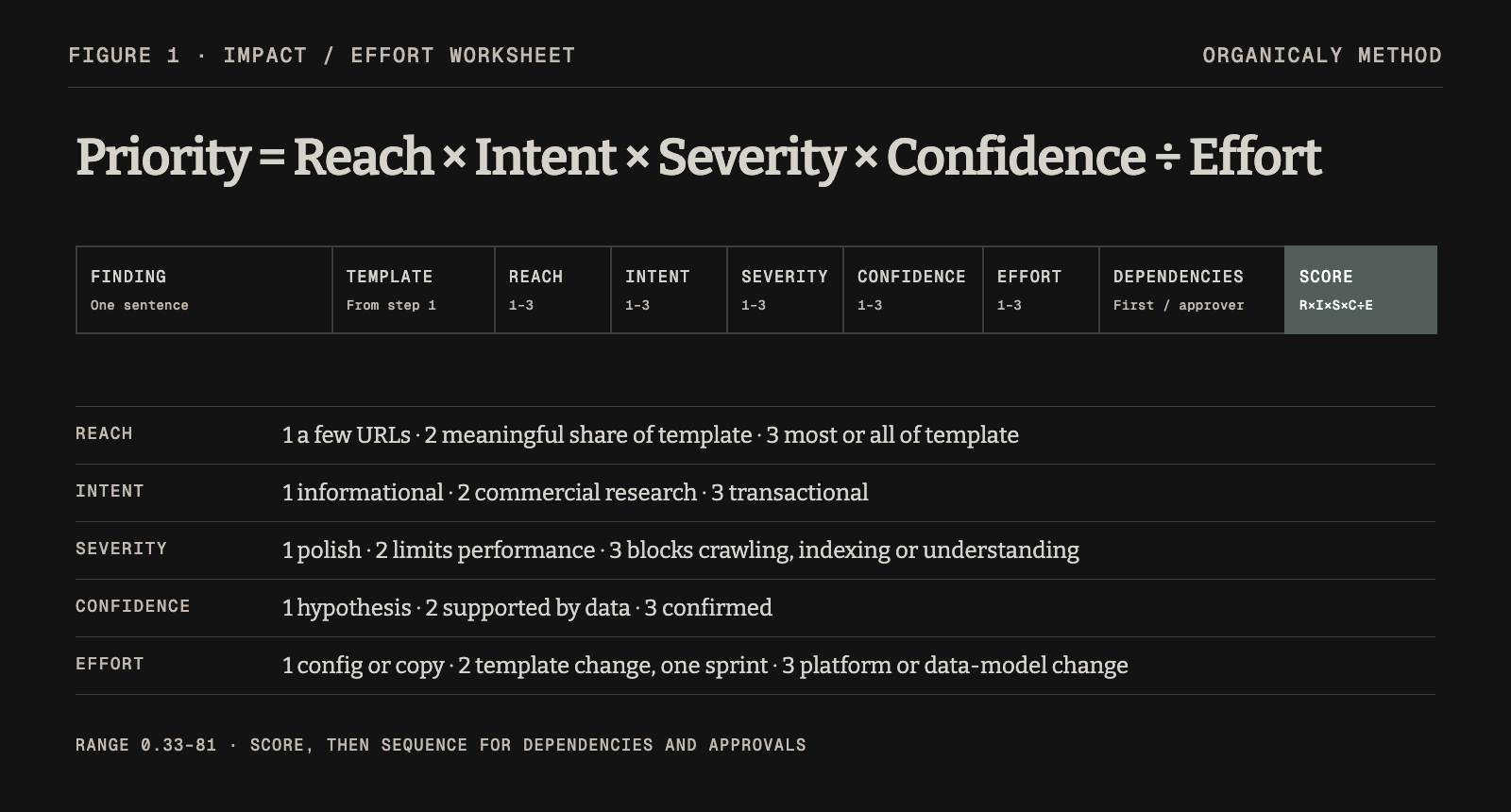
Columns
| Column | What to enter |
|---|---|
| Finding | One sentence: the problem or opportunity |
| Template | Which template it affects (from Step 1) |
| Reach (1–3) | 1 = a few URLs · 2 = a meaningful share of the template · 3 = most or all of the template |
| Intent (1–3) | The buying-intent weight from Step 2: 1 = informational · 2 = commercial research · 3 = transactional |
| Severity (1–3) | 1 = polish · 2 = limits performance · 3 = blocks crawling, indexing or understanding |
| Confidence (1–3) | 1 = hypothesis · 2 = supported by data · 3 = confirmed (for example in Search Console, a crawl or the rendered HTML) |
| Effort (1–3) | 1 = configuration or copy change · 2 = template change, one sprint · 3 = platform or data-model change |
| Dependencies | What must happen first, or who must approve |
| Priority score | Reach × Intent × Severity × Confidence ÷ Effort (range 0.33–81) |
Scoring rules that keep the worksheet honest
- Score confidence separately from severity. Lower confidence reduces the score when the other inputs are equal. A severe unconfirmed finding can still outrank a moderate one; confirm the evidence and apply the blocker rule rather than treating the score as certainty.
- One finding per row. “Improve category pages” is a theme, not a finding.
- Score the template, not the example URL. The example URL is evidence. Reach comes from the template.
- Don’t let effort hide blockers. Any severity-3 item that blocks crawling or indexing of a high-intent template goes into the next planning cycle, whatever its score, even if only to scope it.
A worked example: one category, seven findings
This example is fictional. The store, category, findings and scores are invented to demonstrate the method. They don’t describe a real client or real performance.
The situation. A fictional mid-sized outdoor-gear store sells hiking boots, among other things. Its “Women’s hiking boots” category is a commercial priority, and the team has a backlog of ideas and audit findings. Using the worksheet, they score seven findings that affect this category and the templates around it.
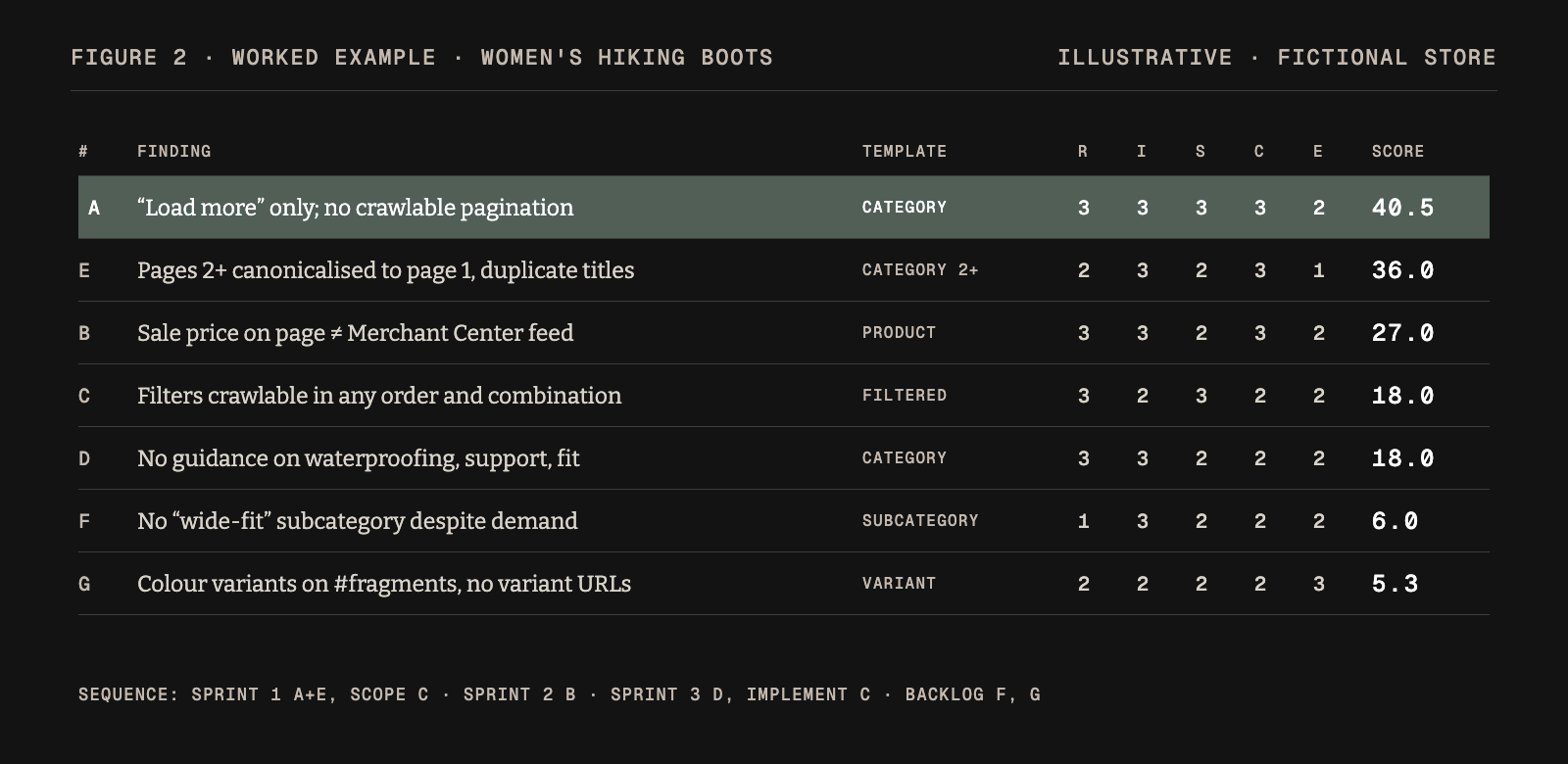
| # | Finding | Template | Reach | Intent | Severity | Confidence | Effort | Score |
|---|---|---|---|---|---|---|---|---|
| A | Products beyond the first 24 load only through a JavaScript “load more” button, with no crawlable paginated URLs | Category | 3 | 3 | 3 | 3 | 2 | 40.5 |
| B | Sale prices on product pages don’t match the Merchant Center feed during promotions | Product | 3 | 3 | 2 | 3 | 2 | 27.0 |
| C | Size, colour and brand filters create crawlable URLs in any order and combination, including empty results | Filtered listing | 3 | 2 | 3 | 2 | 2 | 18.0 |
| D | The category page has no guidance on the decisions shoppers face (waterproofing, ankle support, fit) | Category | 3 | 3 | 2 | 2 | 2 | 18.0 |
| E | Paginated category pages all canonicalise to page 1 instead of using a self-referencing canonical for each page | Category (pages 2+) | 2 | 3 | 2 | 3 | 1 | 36.0 |
| F | No subcategory for “wide-fit women’s hiking boots” despite consistent demand and enough products | Subcategory (new) | 1 | 3 | 2 | 2 | 2 | 6.0 |
| G | Colour variants are addressed with #colour= fragments, so each variant has no indexable URL |
Variant | 2 | 2 | 2 | 2 | 3 | 5.3 |
Ranked: A (40.5) → E (36.0) → B (27.0) → C (18.0) = D (18.0) → F (6.0) → G (5.3)
From scores to a sequenced plan
Scores give you a starting order. Dependencies and capacity then turn it into a plan.
Sprint 1: make the category fully reachable
- A + E together. Both are pagination problems on the same template, so fix them in one change: crawlable paginated URLs linked with
<a href>, a self-referencing canonical on each page. Unique titles are an optional editorial choice, not a pagination indexing requirement. Keep “load more” for shoppers if you like, but back it with real paginated URLs. - C (scoping only). Decide which filtered URLs, if any, deserve to be indexable landing pages, and which should be blocked from crawling. This decision affects F, so make it early.
Sprint 2: make the data agree
- B. Fix the price mismatch at the source: identify which system owns the sale price and make the page, structured data and feed all read from it. This needs approval from whoever owns merchandising and the feed.
Sprint 3: make the page useful
- D. Add concise buying guidance to the category template: a short introduction to the main decisions, links to the relevant subcategories, and links to a deeper fit or waterproofing guide if you have one. Write it for shoppers, with genuine product knowledge. Google’s helpful-content guidance favours first-hand expertise over generic text.
- C (implementation). Apply the crawl rules decided in Sprint 1.
Backlog with a trigger
- F. Revisit once C is done. If “wide-fit” becomes an indexable filtered URL, a separate subcategory may not be needed. If it doesn’t, build the subcategory with real guidance, not just a filtered grid.
- G. Variant URLs need a platform change (effort 3). Log it with the platform roadmap owner and score it again if variant-level demand grows.
Why this order rather than the raw scores? A and E share a fix. C decides the shape of F. B depends on another team’s approval, so it starts early but may finish later. That’s the value of scoring and then sequencing.
Step 5: Ship, log and measure by template
For every change, record:
| Log field | Example (fictional) |
|---|---|
| Change ID | CAT-014 |
| Template | Category (pages 2+) |
| What changed | Crawlable paginated URLs and self-referencing canonicals |
| Pages affected | All paginated category URLs |
| Approved by / date | Named owner · illustrative day 1 |
| Go-live date | Illustrative day 3 |
| Evaluation window | 8 weeks after vs 8 weeks before, same pages |
| What we expect | More product URLs discovered and indexed. Organic entrances to page 2+ |
| Result | (filled in after the window) |
A change log and before-and-after window do not prove that the work caused a result. Record seasonality, promotions, stock changes, algorithm changes, tracking changes and other work on the same pages. Treat observed movement as evidence to investigate, not a controlled causal estimate.
Two practical notes:
- Wait before judging. Google’s starter guide notes that some changes take months to show. Agree the evaluation window before you ship.
- Segment by template. In Search Console, use page filters or URL patterns to isolate a template, such as all category URLs. That lets you judge a template change on the pages it touched, not on sitewide noise.
The category page: what “good” looks like
Category templates often carry the most commercial weight, so they deserve their own checklist. A strong category page usually has:
- a clear, specific H1 that matches how shoppers describe the category
- a short introduction that helps with the main decision, not a block of keyword copy
- crawlable links to relevant subcategories
- a product grid whose items are all reachable through crawlable links (pagination or a crawlable alternative to “load more”)
- filters that help shoppers without creating unlimited crawlable URLs
- links to buying guides that answer the bigger “which one should I choose” questions
- breadcrumbs, with BreadcrumbList structured data where appropriate
- a self-referencing canonical and a descriptive title and meta description; the same title and description may be reused across a paginated sequence
The product page: priorities in one list
- Facts first. Specifications, materials, sizing and compatibility, stated clearly in text and consistent with structured data and the feed.
- Answer the next question. Fit, care, delivery and returns, wherever a shopper would hesitate.
- Original content over manufacturer copy for priority products. Google’s helpful-content guidance asks whether content provides original information and first-hand expertise.
- Variant handling that gives each meaningful variant an addressable URL, with canonicals pointing to the main product where variants use an optional parameter.
- Reviews and media where you have them, marked up correctly.
Applying this to your vertical
The method stays the same across verticals. What changes is how intent and attributes are expressed. Beauty shoppers tend to organise their decisions around ingredients, concerns and routines. Apparel shoppers think in style, size and fit. Seasonal peaks raise the stakes on product data accuracy. Adapt the worksheet to the buying questions and evidence in your own category.
Common pitfalls
- Prioritising by the audit tool’s severity label. Tools don’t know your buying intent or your templates’ commercial weight.
- Fixing URLs one at a time. If the problem is in the template, fix the template.
- Writing category copy before the category is crawlable. Content can’t help pages Google can’t reach.
- Creating subcategories for every keyword variant. Make a page only when it can be genuinely useful and has enough products to compare.
- Letting page, markup and feed drift apart. Decide which system owns each fact.
- Skipping the log. Without go-live dates, it is harder to relate observed performance to the work. Dates provide context, not proof of an isolated effect.
A quick checklist
- Templates inventoried with rough URL counts
- Search demand grouped by intent and assigned to templates
- Technical prerequisites checked per template (links, facets, pagination, variants, structured data, feed)
- Findings scored: Reach × Intent × Severity × Confidence ÷ Effort
- Sequence adjusted for dependencies and approvals
- Every change logged with a go-live date and an evaluation window
- Results reviewed by template, and the backlog re-scored
Where this fits
E-commerce SEO is the foundation of organic growth for an online store, but it isn’t the whole of it. The same product facts feed shopping surfaces, AI answers, social posts and community conversations. A prioritised, logged SEO programme is what keeps those facts reachable and consistent everywhere else.
Sources: Google Search Central documentation as linked throughout, linked for verification. The template map, scoring worksheet and worked example are Organicaly’s own method and a fictional illustration.
For the broader context, read the local drafts SEO in 2026 and Introducing Organicaly.